

Almost everyone will be interesting to learn the shortcuts of your day to day tasks. This post is going ot list few of the Keyboard shortcuts of vSphere Web Client. I verified the key board shortcuts of vSphere Web Client and it is really nice to have shortcuts which move towards different inventory items in vSphere Web Client. I believe it helps to switch between inventory items in Web client simply by Keyboard shortcuts without your Mouse clicks. 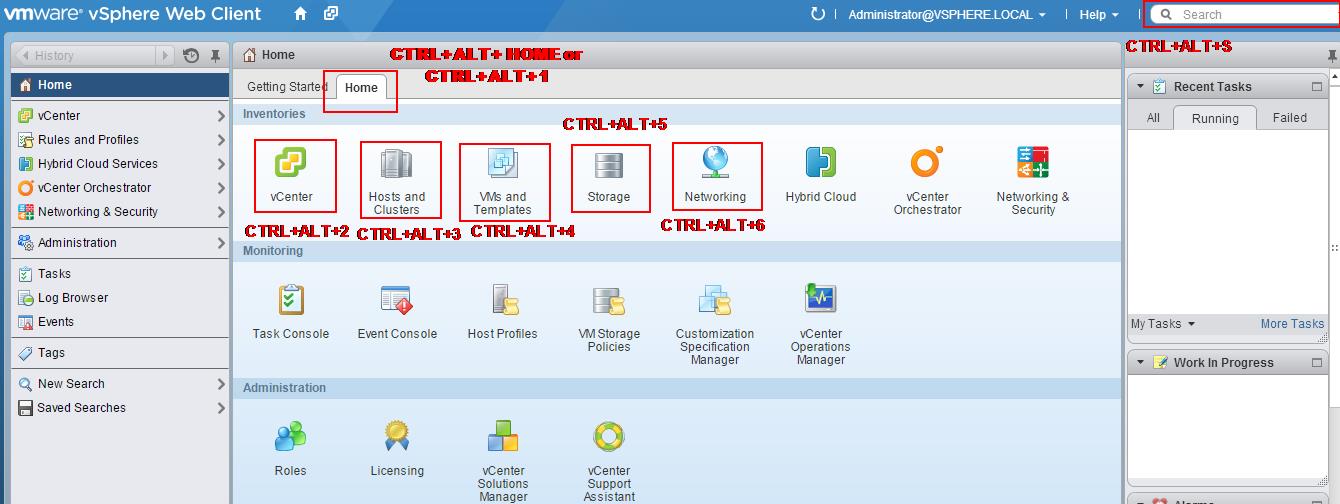 Below are the list of Keyboard Combination and action related to the keyboard combination. Try to remember the shortcuts which helps to switch quickly between vSphere Web Client.
| Keyboard Combination | Action |
Ctrl+Alt+Home OR Ctrl+Alt+1 | Home Screen |
Ctrl+Alt+2 | Virtual Infrastructure Inventory |
Ctrl+Alt+3 | Hosts and Clusters Inventory |
Ctrl+Alt+4 | VMs and Templates Inventory |
Ctrl+Alt+5 | Datastores and Datastore Clusters Inventory |
Ctrl+Alt+6 | Networking Inventory |
Ctrl+Alt+s | Inventory Search |
I hope this is informative for you. Thanks for Reading !!!. Be Social and share it in social media, if you feel worth sharing it.