
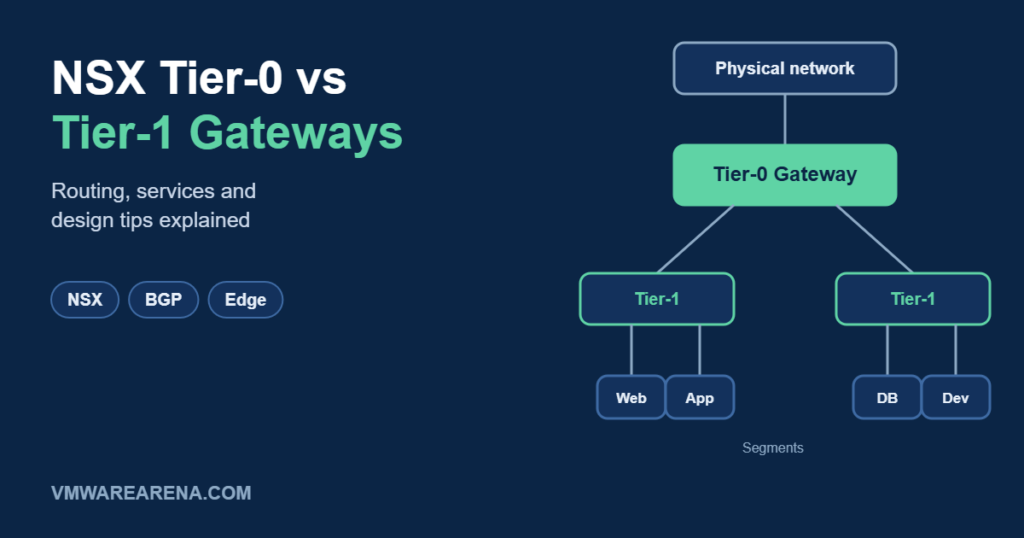
One of the first things to understand in NSX is its two-tier routing model. Traffic between your VMs and the outside world passes through two kinds of gateways: Tier-0 and Tier-1. Getting their roles right makes the rest of your NSX design much simpler. In this post, I’ll explain what each tier does, how the distributed and service router components work, and some practical design tips.
Tier-0 Gateway: The Door to the Physical Network
The Tier-0 gateway handles north-south traffic between NSX and your physical network. It peers with your top-of-rack or core routers, usually with BGP, and advertises NSX networks to the outside world.
- Connects to physical routers through uplink interfaces on NSX Edge nodes.
- Runs dynamic routing (BGP, or OSPF) and static routes.
- Can run in Active-Active mode for maximum throughput with ECMP, or Active-Standby when you need stateful services.
- Usually owned by the infrastructure or network team.
Tier-1 Gateway: The Tenant or Application Router
The Tier-1 gateway connects your overlay segments and links them up to a Tier-0. Think of it as the router for one tenant, one application, or one environment.
- Segments (the subnets your VMs live on) attach to a Tier-1.
- Has no dynamic routing protocol; it advertises its connected networks, NAT IPs and load balancer VIPs up to the Tier-0 automatically.
- Runs in Active-Standby mode when it has stateful services, such as NAT, gateway firewall or load balancing.
- Can be delegated to application or tenant teams.
Distributed Router vs Service Router
Each gateway can have two components, and this is where most of the confusion comes from:
- Distributed Router (DR): runs in the kernel of every ESXi host transport node. Routing between segments happens right on the host where the VM runs, so east-west traffic never needs to leave the host to reach an Edge.
- Service Router (SR): runs on the NSX Edge nodes. It’s created only when you need something that can’t be distributed: uplinks to the physical network, NAT, gateway firewall, VPN, DHCP server or load balancing.
A Tier-1 with no services has only a DR, so all its routing stays fully distributed. As soon as you add NAT or a gateway firewall to a Tier-1, NSX creates an SR on the Edge cluster, and traffic that needs that service passes through the Edge.
Tier-0 vs Tier-1 at a Glance
| Tier-0 | Tier-1 | |
|---|---|---|
| Main role | North-south connectivity to the physical network | Connects segments for a tenant or application |
| Connects to | Physical routers and Tier-1 gateways | Segments and one Tier-0 |
| Dynamic routing | BGP / OSPF | None; route advertisement to Tier-0 |
| HA modes | Active-Active or Active-Standby | Active-Standby (when it has an SR) |
| Typical owner | Infrastructure / network team | Application or tenant team |
Design Tips
- Keep Tier-0 Active-Active when you can. Put stateful services such as NAT on Tier-1 gateways instead, so the Tier-0 can use ECMP across all Edge nodes.
- Don’t add services you don’t need. A Tier-1 without services stays fully distributed and avoids hair-pinning traffic through the Edges.
- Use separate Tier-1s for separation, such as one per tenant, environment or application. It keeps NAT, firewall rules and ownership clean.
- Size the Edge cluster for the services you run. Load balancing and VPN need more Edge capacity than plain routing.
- Look at VPCs in VCF 9. VPCs and Transit Gateways build on this same model and give application teams self-service networking. See my post on VPCs and Transit Gateways in VCF 9.
Once the Tier-0 and Tier-1 roles click, NSX routing becomes predictable: Tier-0 talks to the physical world, Tier-1 serves your workloads, and the distributed router keeps as much traffic as possible on the host. Questions about your own design are welcome in the comments.